How to Find the Default Gateway IP Address in Linux (Step-by-Step Guide)
In this quick guide, I will show you how to find the default gateway IP address in Linux using the terminal. This is useful when you are troubleshooting network issues, checking your router’s IP, or learning basic Linux networking.
Check IP Configuration With ip add
Usually, when we want to see the IP configuration on a Linux system, the command we use is:
ip addThis command displays the IP configuration for all network interfaces.
But one important thing that the ip add command does not show is the default gateway. So even though it shows your network interfaces, it does not display the gateway information.
View the Default Gateway Using the Routing Table
To find the default gateway in Linux, you need to look at the routing table. The command for this is:
ip route showYou can also use shorter versions of the same command:
ip routeip r
Any of these commands will display the routing table.
Identify the Default Route (Gateway)
In the routing table, the default route shows your default gateway IP address. For example, you might see:
default via 192.168.1.1 dev ens33 proto staticHere:
192.168.1.1is the IP address of your default gateway- The route is connected through the interface, for example
ens33 - If you don't see a default route, the default gateway has not been assigned to your computer.
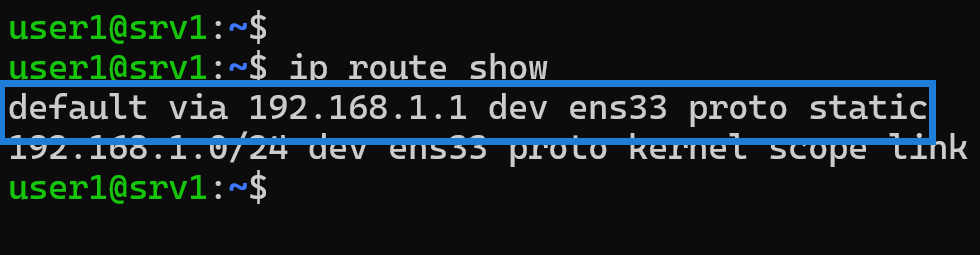
This is the gateway your Linux system uses to reach external networks, including the internet.
Static vs. DHCP Default Gateway
You may also notice a label such as static or dhcp:
- static means the default gateway was manually configured
- dhcp means it was assigned automatically by your DHCP server (usually your router)
This helps you understand how your system received its network configuration.
Summary
To find the default gateway IP address in Linux:
ip add→ Shows interface IPs but not the default gatewayip route,ip route show, orip r→ Shows the routing table- Look for the line starting with default → This is your gateway IP
This simple method works on all Linux distributions including Ubuntu, Debian, Linux Mint, CentOS, Fedora, Arch, and more.