How to Show Git Branch Name in Ubuntu Terminal (Bash Prompt)
If you are working with Git on Ubuntu, having your current branch name visible in the terminal is a huge productivity boost. By default, the Ubuntu bash prompt doesn't show this information. In this guide, I will show you how to configure your .bashrc file to display the Git branch you are working on.
Step 1: Locate the git-sh-prompt Script
Before we edit any files, you need to make sure you have the git-sh-prompt file on your computer. This script is what allows Bash to "see" your Git status.
- Standard Installation: If you installed Git using the
sudo apt install gitcommand, the file is located at:/usr/lib/git-core/git-sh-prompt. - Custom Installation: If you used a different source to install Git, you will still have this file as it is part of the Git installation, but you must ensure you use the correct path.
Step 2: Edit the .bashrc Configuration File
We need to add our configuration to the .bashrc file located in your home directory. Go to your home directory: Run the cd command without any options:
cdOpen the file: Use a text editor like Nano to edit the file:
nano ~/.bashrcAdd the Configuration: Scroll to the end of the file and paste the configuration that sources the Git prompt script and updates your PS1 variable:
source /usr/lib/git-core/git-sh-prompt
PS1='\[\e[32m\]\u@\h\[\e[0m\]:\[\e[34m\]\w\[\e[33m\]$(__git_ps1 " (%s)")\[\e[0m\]\$ '
Step 3: Reload Your Terminal Settings
After saving the file and exiting the editor, you need to reload the .bashrc file for the changes to take effect. Run this command:
source ~/.bashrcFinal Result
Your Ubuntu Bash terminal now shows the Git branch name directly in the prompt.
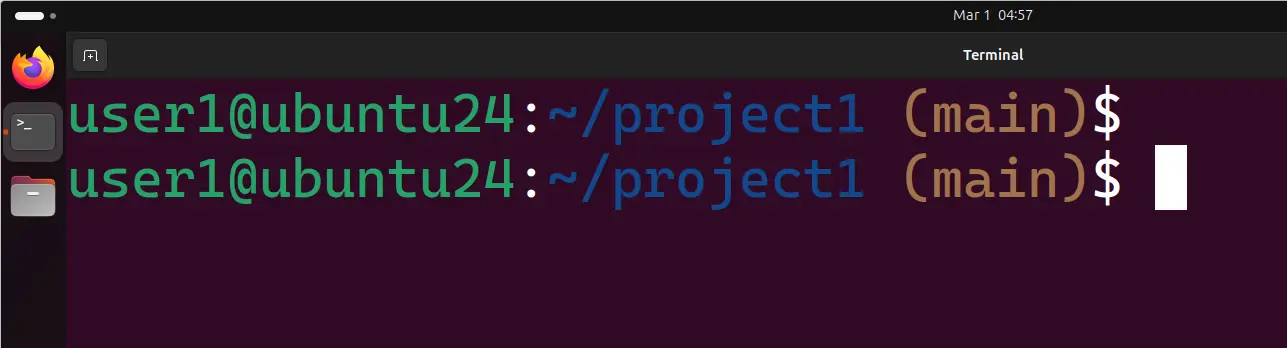
This makes it easier to know which branch you are working on without running extra Git commands.
Why You Need the Git Branch in Your Prompt
When working on a Git project, it is easy to lose track of which branch you are on. Instead of constantly running the git branch command, we can configure the terminal to show the branch name automatically.